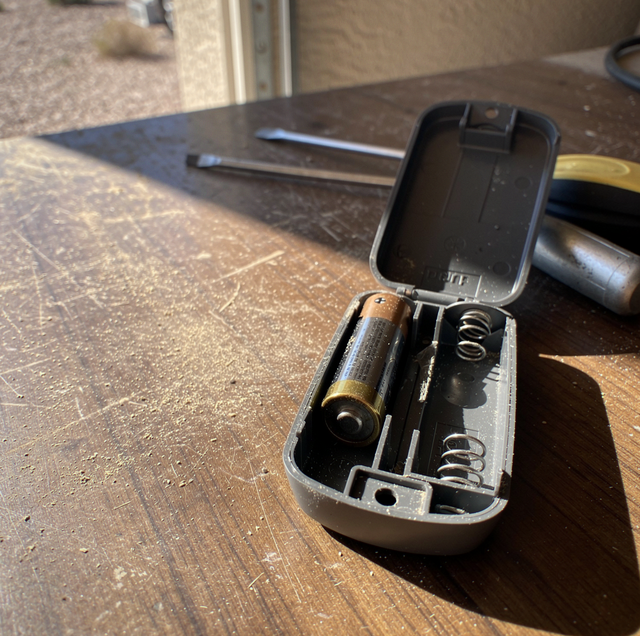
You already popped the back off the transmitter, dropped in a battery you tested with a meter minutes earlier, and pressed the case shut until it clicked. The door still doesn't move. No light on the receiver, no chirp from the opener, nothing but the same quiet response you got with the dead battery in it. That's a different problem than an opener that runs its motor without moving the door at all; this one never even hears you.
What a Fresh Battery Actually Rules Out
A remote has one job: turn stored charge into a radio pulse strong enough to reach the receiver mounted on the opener head. Swapping the battery tests exactly that, and only that. It confirms the cell can push current. It does not confirm that the cell is actually touching the contact that carries the current, that the code riding on the pulse still matches what the receiver expects to hear, that the receiver's antenna is intact, or that nothing nearby is drowning out the signal before it arrives. A power test and a system test are not the same check.
The remote lights up when you press it (on models with an indicator), it clicks the way it always has, and it's brand new, so the instinct is to rule the remote out entirely and start suspecting the opener. Both of those instincts skip a step. The battery swap eliminated exactly one failure mode. Three or four more sit between a working battery and an open door, and none of them announce themselves the way a dead cell does.
Press the Wall Button First
Before anything else gets diagnosed, one test divides the problem in half: the wall-mounted control button. It runs on a hardwired connection directly to the opener's control board, bypassing the transmitter, receiver, and antenna entirely. Press it. If the door runs normally, the motor and control logic are sound, and the fault lives somewhere in the wireless path, the remote itself, its contact, or the receiver hearing it. If the wall button also fails to move the door, the remote was never the problem; the fault sits in the opener, not the transmitter you've been troubleshooting.
That same test extends to a keypad. A keypad talks to the same receiver a remote does, just without a battery to blame. If the wall button operates the door normally and the keypad still doesn't work, the fault is at the receiver, not at any single remote, because a receiver failure takes down every wireless path feeding it at once while leaving the hardwired button untouched. A working wall button and a dead remote narrow the search to three places: the remote's power path, the code it sends, and the receiver's ability to hear it.
The Contact Point a Battery Swap Doesn't Touch
A battery sitting against a spring contact for a year or two leaves a thin film of oxidation on both surfaces, battery terminal and contact tab alike. That film can be thin enough to still read full voltage on a multimeter held to bare metal, and thick enough to block the brief current spike a transmitter needs the instant you press the button. Drop a new battery into a compartment with a corroded contact and the connection is exactly as marginal as it was with the old one. The battery changed. The point where it has to make contact didn't.
The contact clip itself can also be the fault. It's bent to a specific tension so it presses the cell firmly against the opposite terminal, and a dropped remote or enough summer heat cycles baking it on a dashboard can flatten that spring just enough that it no longer holds firm pressure, while still looking straight to the eye.
There's a version of this that catches people who did everything else right: a battery goes in at the correct voltage, correct orientation, and the case gets snapped shut before the cell has fully seated against the contact, leaving it a hair short of where it needs to sit. The case still closes flush, so nothing looks wrong from the outside. That fraction of a millimeter is often the entire gap between a working connection and an open circuit, and the fix is to reopen the case and press the battery firmly home before closing it again, rather than trying yet another battery from a different pack.
Why a Working Remote Can Still Be Locked Out
Garage remotes don't send the same code twice. Each press sends the next value in a long one-way sequence, specifically so the signal can't be recorded and replayed by someone standing in the driveway with the wrong intentions. Both the transmitter and the receiver track a position in that sequence, and the receiver only accepts a transmission that lands within a window of the next several hundred expected values, close enough to prove it's the genuine remote without demanding an exact match on the first try after a stray press.
That window is how a perfectly functional remote can go quiet without anything actually breaking. Enough presses made while the remote is out of the receiver's range, a kid working the button in the back seat, a spare clicker riding loose in a bag, and the sequence can drift past what the receiver is still listening for. A battery swap moves that count in neither direction. The transmitter keeps its place in non-volatile memory, which holds through a flat cell and an empty compartment alike, and a remote sitting powered down transmits nothing at all, so neither side advances while it waits. Presses made where the receiver can't hear them are what push a remote past the window; time spent dead is not.
That is why a battery swap can leave the symptom exactly where it was. A dead cell and a drifted counter are two independent faults that produce the same silence, and replacing the battery clears only the first. A transmitter that spent a few dozen presses in a pocket, well out of range, comes back to the door powered, clicking, its indicator lit, and still sending a code the receiver stopped watching for.
Re-learning a remote usually means reaching the opener head itself, mounted well above easy reach. Set a stable ladder on level, unobstructed ground; never balance on a chair or the door's own track to get there.
The fix for a desynced remote isn't anything done to the remote. It's a re-learn at the receiver, which tells the opener's memory to accept a new starting point from that specific transmitter. Most receivers clear a memory slot through a learn button reached at the opener head, and the process is often most reliable after a full power cycle first: cut power at the outlet or breaker, wait a moment, then restore it before starting the learn sequence, since some receivers hold onto a corrupted state until the power actually drops and comes back.
The Receiver's Own Weak Points
The antenna doing the listening is usually a short length of wire hanging loose from the opener head, and it only works at full range while it hangs freely. Pushed flat against the metal housing, coiled up out of the way, or clipped short during an install, that same antenna can lose most of its effective range, turning a signal that used to reach the driveway into one that barely clears the workbench. A nicked or corroded end does the same thing to the copper itself.
Interference is the other half of the receiver's problem, and it's grown more common than it used to be. LED bulbs installed in the opener's own light housing carry a driver circuit that can radiate electrical noise across the same low-UHF band the receiver listens on, and that noise sits close enough to drown out a legitimate signal arriving at the same instant. A second transmitter nearby sharing that band, another garage remote, a car key fob, certain wireless doorbells, can do the same thing at the exact moment you press the button, without ever being the thing you'd suspect first.
When the Remote Speaks a Different Generation Than the Receiver
Every receiver was built to understand a specific code architecture when it left the factory, and a remote bought off the shelf today is built around whatever that architecture is at the moment. Receivers old enough to predate rolling-code technology altogether, the kind set with physical dip switches rather than a learn button, simply can't hold a conversation with a current replacement remote, no matter how many times it's re-learned or how fresh the battery inside it is. The two sides aren't out of sync; they were never speaking the same language to begin with.
That age boundary is worth knowing before spending more time chasing contacts and interference. A receiver from that earlier generation needs a remote built to match its own architecture, not a universal replacement pulled off a rack, and pairing the two eventually comes down to matching hardware rather than diagnosing a fault.
Frequently Asked Questions
The indicator draws a trickle of current next to the radio burst that follows it. A coin cell near the end of its life can hold close to full voltage while it lights that LED, then sag the moment the transmitter asks for the much larger spike a transmission needs. A meter reading taken with nothing drawing on the cell will not show that collapse, because the cell only fails under load.
Not with a phone camera. That trick works on a TV remote because it flashes infrared light, which a camera sensor picks up, while a garage remote sends a UHF radio signal no camera can see. The reliable check is to see whether the wall button and keypad still work, which indicates whether the fault lies in the remote's path or at the receiver.
No, though it does not help either. A receiver only ever counts forward, accepting a value ahead of its own position inside the window but never one behind it, so a transmitter that has already run past that window cannot fall back into it by being pressed more. Each extra press simply widens the gap a re-learn has to close.
Only if it can transmit on the band your receiver listens for and in the code format that receiver expects. Universal remotes are switchable rather than automatic, so most have to be set by hand to the right band and format before they will pair at all. Left on the wrong setting, the remote runs through every programming attempt and still never gets heard.
Most residential receivers built in the last couple of decades hold several remotes plus a keypad at once, each in its own memory slot. Re-learning one transmitter does not erase or affect the others. A longer press of that same learn button does something different, though: it clears the entire memory at once, which means reprogramming every remote and the keypad afterward.
Scrape the film off rather than trying to dissolve it. A pencil eraser or a folded strip of fine emery paper, worked over the contact tab and the battery's own terminal, mechanically removes the oxide, which restores the connection. Solvents and household cleaners tend to spread the residue around rather than lift it, so finish dry and seat the fresh cell against bare metal.
Schedule a receiver and opener check — if the wall button won't move the door either, the fault sits at the opener, not the remote you've been testing. Quality Overhead Door serves Mesa and the East Valley. ROC #310144. Call (480) 838-8850.